
How to Film Your Lifts for AI Form Analysis
7 min read
AI form analysis can only measure what the camera can see. The right angle, your whole body in frame, a steady phone and decent light are the difference between numbers you can trust and a result you have to second-guess. This guide uses the same camera angles the FormLens app asks for, explains why each lift is filmed the way it is, and ends with a quick check to run before every set.
Why the camera angle matters
Your phone records in two dimensions. A joint angle is measured cleanly when the movement happens across the camera's view, and poorly when it happens toward or away from the lens. A knee bending straight at the camera barely seems to bend; the same knee seen from the side is obvious. Every FormLens analysis is an estimate from a single camera, so the angle you film from decides which measurements are reliable.
That's why there is no single best angle. Each lift is filmed from the angle that shows what FormLens measures for it — and for squats and overhead presses that's the front, not the side.
Camera-based pose estimation can be repeatable when the setup is controlled: in a 2025 study of 30 adults, a markerless pose-estimation app gave consistent hip and knee range-of-motion readings on retest (ICC 0.74–0.93) that tracked a reference measure closely (Hellstén 2025 (opens in a new tab)). The controlled setup is the part you're responsible for.
Where to put the phone for each lift
| Lift | Phone position | What that angle lets FormLens see |
|---|---|---|
| Squat | In front of you, at hip height | Depth, left/right knee balance, heel lift, stance width and foot flare (toe-out) |
| Bench press | At the foot of the bench, looking up it | Both arms: elbow depth, left/right balance and elbow flare |
| Deadlift | To your side, at hip height | Hip extension, torso angle and lockout — the hinge happens side-on |
| Overhead press | In front of you, at hip height | Both elbows for the lockout check, and your hip line |
| Running | To your side, at hip height, room for a few strides. We suggest your right side — here's why | Your feet and full stride: cadence, bounce and shin angle at landing |
Front-on
Squat · Overhead press
Foot of the bench
Bench press
Side-on
Deadlift · Running
Front-on squat depth reads conservatively
Knee bend is a side-on movement. From the front, the camera sees your thigh end-on, so FormLens can read your knee angle higher — shallower — than it really is, and a squat at depth can be flagged as short. Use the depth numbers as a trend against your own sets filmed the same way. To check depth against the powerlifting standard, film one extra set from the side and judge hip crease against knee yourself. More in Squat depth explained.
Filmed a squat from the side anyway? FormLens still counts your reps, but stance width and foot flare (toe-out) need the front view (the app shows “Front View Required”), and with one leg hiding the other there's no honest left/right reading.
Set up the shot
- Phone at hip height. A phone propped high and tilted down, or low and tilted up, distorts every angle. Hip height with the lens level is what the app asks for.
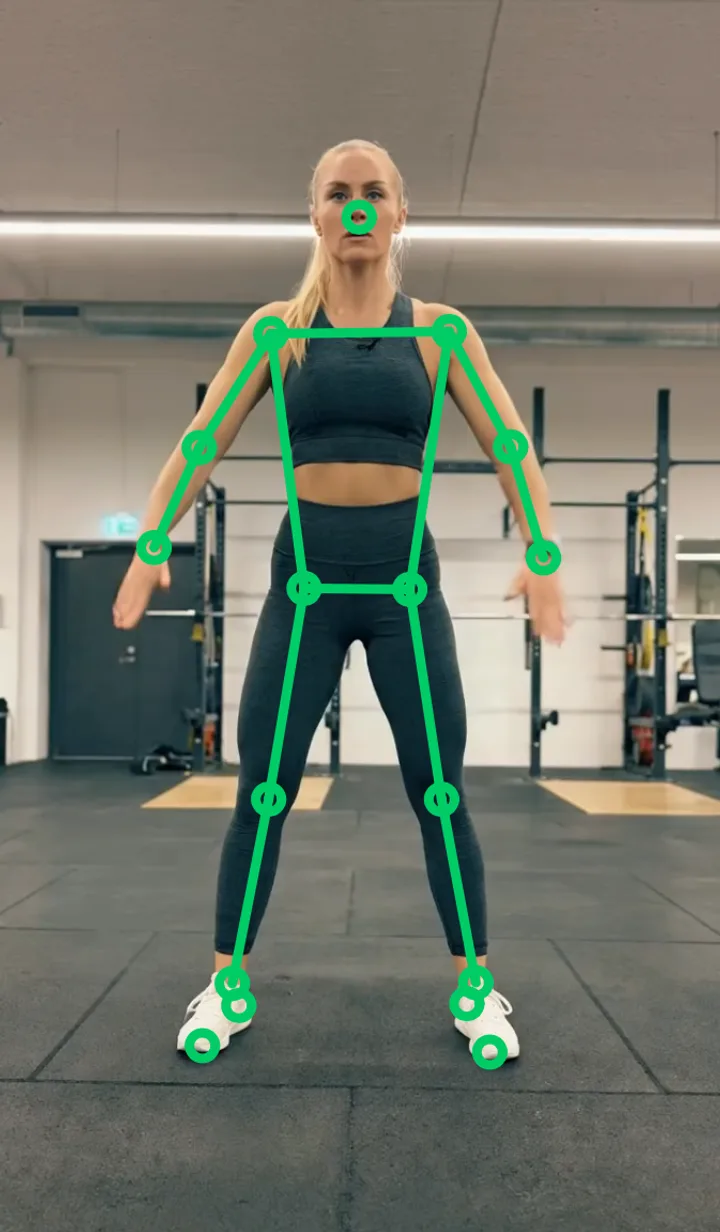
- Whole body in frame, with margin. Head to feet — and the bar — at the lowest point of the rep and at full lockout. In most gyms that means 2–3 m (6–10 ft) away; for running, far enough to catch a few full strides, with the phone on your right as you run past — FormLens reads your shin angle for a runner crossing the screen left to right (more on that).
- Portrait, not landscape. Hold or prop the phone upright. Landscape videos aren't supported yet.
- Keep it still. Lean it on a bench, a plate or a small tripod. A handheld phone moves the frame FormLens measures against.
- Light in front of you, not behind. A bright window or rack light behind you turns you into a silhouette, and the tracker loses your joints.
- Fitted clothing, clear line of sight. Baggy shorts hide your hips and knees, and people walking through the frame can pull the skeleton off you for a few frames. On the bench, dark clothes on a dark pad track poorly.
- One set per clip. Record, rack, stop. If you analyse a clip from your library, keep it under 90 seconds.
The 10-second pre-flight check
Before your first working set, do one warm-up rep in front of the camera and check:
- Your head and feet are visible at the bottom of the rep and at lockout.
- On the recording screen, the skeleton sits on your joints and stays there as you move. Jumping or missing points mean the light, clothing or framing needs fixing.
- The phone won't move when you rack or drop the bar.
- Nothing — a rack upright, a plate tree, a training partner — sits between you and the lens.
- It's the same setup you used last time.
Common filming mistakes
- Filming from above. A phone on a high shelf looks down on you and compresses depth and joint angles.
- Cropped feet. Heel lift and stance can't be read, and on a run FormLens can't find your foot strikes.
- The wrong side for the lift. A deadlift filmed from the front hides the hinge; a squat filmed from the side can't show stance or left/right balance.
- Backlight. Joints disappear into a silhouette, especially at the bottom of the rep.
- Long clips. Walking in, chatting and re-racking add movement that isn't a rep. If the rep count looks wrong, you can mark the reps yourself on the results screen.
- A different setup every week. The numbers stop being comparable — and comparability matters more than any single reading.
Film it the same way every time
The most useful thing a form score does is move over time, and that only means something if the camera stays the same: same angle, same height, roughly the same distance, similar light. Pick a spot in your gym, remember where the phone goes, and reuse it. Then a change in your trend is a change in your lifting, not in your filming.
What your form score meansThe bands, the breakdown, and how to read your trendWhat happens to the video
Your workout videos never leave your phone. FormLens reads joint positions from the video on your device and sends only those numbers for coaching — never the video, never a photo. An AI model on FormLens's servers turns those numbers into your score and coaching. The details are in the privacy policy.
FAQ
Can I film my squat from the side instead?
For judging depth or butt wink by eye, a side view is the best angle. But FormLens's squat analysis is set up for front-on video: from the side it can't read stance width or foot flare (toe-out), and one leg hides the other, so left/right balance is lost. Film squats from the front for the app, and add a side-on set when you want to check depth yourself.
Do I need a tripod?
No. Any stable surface at about hip height works — a bench, a box, a stack of plates. A small tripod or phone clamp just makes it quicker to find the same spot every time.
Can I analyse a video I've already filmed?
Yes. You can record in the app or pick a clip from your Photos library. Clips need to be portrait and under 90 seconds — one set is enough.
How far away should the phone be?
As close as you can get while your whole body and the bar stay in frame through the entire rep — usually 2–3 m (6–10 ft). If anything leaves the frame, move back.
Does it work in a dim gym?
It needs to see your joints. Even, dim light is better than one bright light behind you. If the skeleton flickers on the recording screen, add light in front of you or move to a brighter spot.
Is my video uploaded anywhere?
No. Your workout videos never leave your phone. FormLens reads joint positions from the video on your device and sends only those numbers for coaching — never the video, never a photo.
Sources
- Hellstén T, Arokoski J, Karlsson J, Ristolainen L, Kettunen J. Reliability and validity of computer vision-based markerless human pose estimation for measuring hip and knee range of motion. Healthc Technol Lett. 2025;12(1):e70002. View study (opens in a new tab)
Educational only — not medical advice. FormLens is a training aid, not a medical device; measurements are estimates from a single camera. If something hurts, see a physio or doctor. Terms of Use
First published · Last updated · By FormLens